 FILE TRIMMER PRO
Cut the best bit of every song in seconds.
Load your MP3s and music videos, mark where each clip starts, and File Trimmer Pro makes all the clips at once, ready for your quiz rounds, bingo games and sets.
- MP3 & MP4
- Batch clips
- Reverse & speed effects
- Medley Maker
- Mac & Windows
One-off payment · no subscription · no licence key
How it works
No editing timeline, no fiddly exports one song at a time.
Add your music
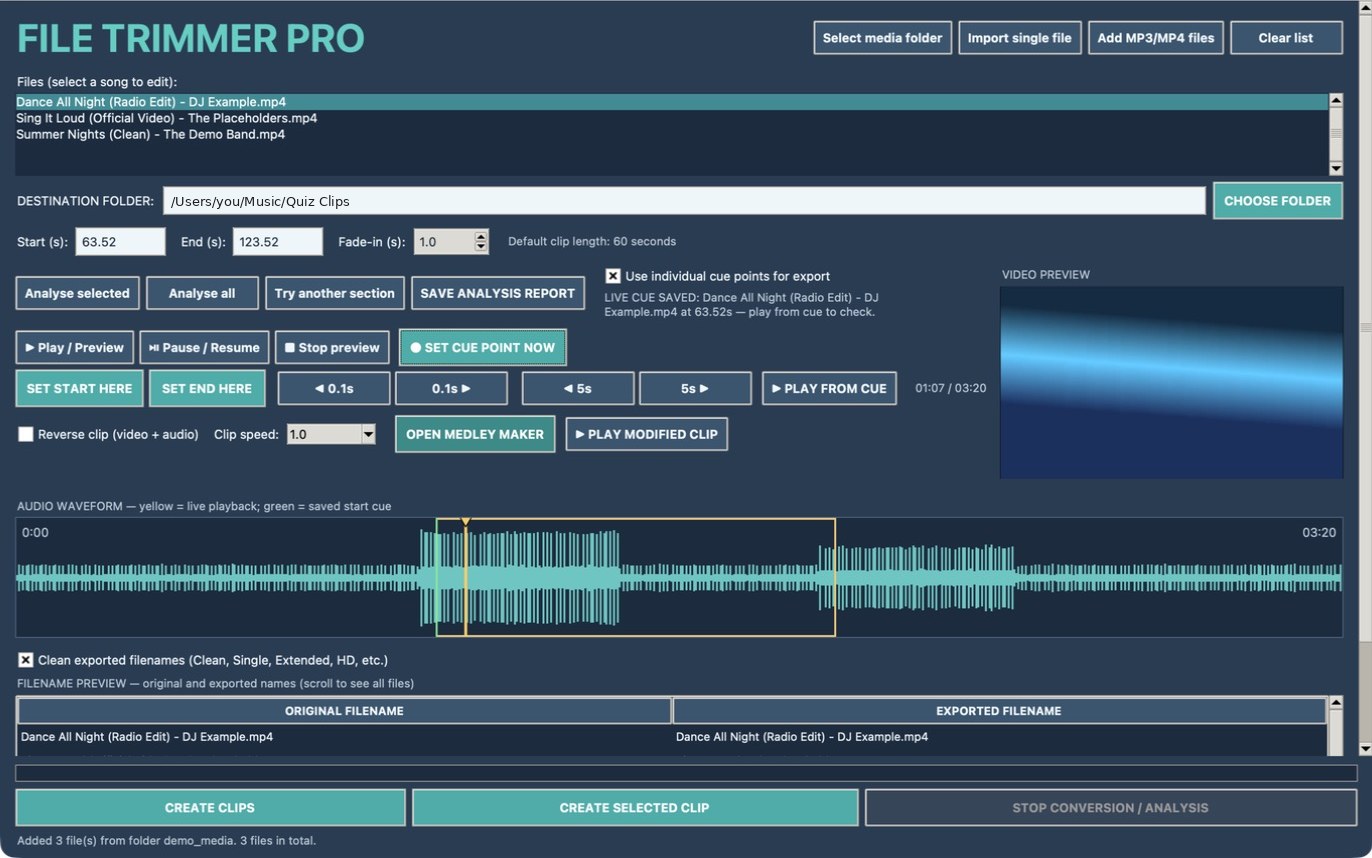
Pick a folder or add MP3 and MP4 files. Each song's waveform loads so you can see the loud parts at a glance.
Find the best bit
Double-click the waveform to play from any point, watch the video, and press Set cue point now when you hear it.
Pick your clip length
60 seconds by default, or any length you like, with an optional fade-in so clips don't start abruptly.
Create all the clips
One click makes every clip from its own cue point. Your originals are never touched or overwritten.
Everything you need for music rounds
Built for people who make the same kind of clips every week.
Waveform & video preview
See the song's shape, play from any point with a double-click, and nudge your start by 0.1 or 5 seconds until it's exactly right.
Suggested sections
Analyse a song and File Trimmer Pro suggests sections worth checking, such as the loudest, most repeated parts. Try another if you don't like the first.
Batch clips
Every song keeps its own cue point, so a whole round of clips is made in one go. It warns you if a song is too short for the clip length.
Reverse & speed
Make clips play backwards (video and sound), or from half speed to double speed with the pitch kept natural. Perfect for “name that tune” rounds.
Play before you save
Hear and watch the reversed or sped-up clip before you export it, so there are no surprises on quiz night.
Tidy file names
Optionally removes clutter like “(Clean)”, “(Official Video)” and “HD” from exported file names, with a preview of every name first.
Medley Maker
Join several music videos into one medley, each song starting from its own cue point, ideal for picture rounds, intros and Music Bingo.
Your order, your timings
Choose the songs, put them in order and set how long each one plays.
Bits between songs
Optionally add a short sound between each song, with its own volume. One is included, or use your own.
Preview, then save
Watch a quick preview first. The finished medley keeps picture and sound in sync from the first song to the last.
Who it's for
If you cut music clips more than once a month, it pays for itself the first evening.
Quiz hosts
Intro rounds, reversed songs, sped-up clips and video picture rounds, made in minutes instead of an evening.
Music Bingo
A whole playlist of equal-length clips from the best part of each song, plus medleys for breaks.
DJs & entertainers
Short versions and teasers of your music videos and tracks, with clean file names, ready to drop into your software.
Get File Trimmer Pro
£4.99 one-off payment through PayPal. Download straight after paying. Free updates through the download page.
File Trimmer Pro for Mac
Version 1.0.0 · Apple Silicon Macs (M1 or newer) · macOS 11 Big Sur or later
- Signed and notarised by Apple, so it opens normally
- Everything included: no other software to install
- Free updates via the download page
File Trimmer Pro for Windows
Version 1.0.0 · Windows 10 and 11 (64-bit)
- Simple installer, everything included
- Same features as the Mac version
- Free updates via the download page
Already bought? Download your copy or the latest update →
Questions
What files does it work with?
MP3 audio and MP4 video files. Clips are saved in the same format as the original.
Will it change or delete my original files?
No. File Trimmer Pro only reads your originals and saves new clips to the folder you choose. It never overwrites a file; if a name is taken it adds a number, such as “Song (2).mp4”.
Do I need to install anything else, like FFmpeg or VLC?
No. Everything File Trimmer Pro needs is built in.
Is it a subscription?
No. It's a one-off payment of £4.99, with no licence key and no account to create. Keep the order reference shown after paying: with it and your PayPal email you can download your copy again and get updates.
Which Macs does it run on?
Macs with Apple Silicon (M1, M2, M3, M4 and newer) running macOS 11 Big Sur or later. Older Intel Macs aren't supported.
Does “Suggested sections” always find the chorus?
Not always. It suggests sections that are worth checking, based on how loud and repetitive the music is. You can try another suggestion, or just pick your own cue point by ear.
Can I use the clips in public?
File Trimmer Pro is a tool for cutting your own files. Playing music in public needs the usual music licences for your venue or event, as with any music you play.